After migrating my site from Blogspot to Cloudflare Pages, my analytics completely broke. Two days of debugging, dozens of failed attempts, and finally — a working setup. Here is the complete story.
The Starting Point
My site was built from scratch — custom HTML, CSS, and JavaScript deployed on Cloudflare Pages. I wanted production-grade analytics: GA4 tracking, server-side events, and privacy-compliant data collection.
I set up Google Tag Manager (GTM), created a GA4 property, and added the container code to my site. Everything looked correct.
But GA4 Realtime showed 0 users. Hour after hour. Something fundamental was wrong.
What I Tried First (And Why It Failed)
My initial approach was pure client-side GTM:
- GTM Container with GA4 Configuration tag
- GA4 Event tag for page_view
- CSP headers updated to allow Google domains
- Cloudflare cache purged multiple times
Nothing worked. I inspected the network tab — the GTM script was not even loading. The CSP was blocking it silently.
The Three Real Problems
Problem 1: CSP Syntax Errors
My Content Security Policy had duplicate domains and a missing semicolon. One tiny syntax error broke the entire CSP — which blocked GTM from loading entirely.
I rewrote the CSP with proper directive separation:
script-srcfor GTM and Google Analyticsconnect-srcfor XHR calls to Google Analyticsimg-srcfor tracking pixels
The policy now loads cleanly — and GTM started running.
Problem 2: Missing Event Tag
Here is something most tutorials skip: the GA4 Configuration tag only initializes the GA4 library — it does not send page_view events automatically.
I needed a separate GA4 Event tag with an "All Pages" trigger. Once I added that, page_view events started flowing into GA4 Realtime.
Problem 3: Client-Side Blocking
Even with GTM working, client-side tracking was unreliable. Modern browsers block third-party cookies by default. Mobile browsers are even stricter. Ad blockers can kill tracking entirely.
Client-side tracking alone is not enough anymore. I needed a server-side solution.
The Solution: Cloudflare Zaraz
The breakthrough came when I discovered Cloudflare Zaraz — Cloudflare's native server-side tag manager.
Zaraz executes analytics at Cloudflare's edge network, before the page even reaches the user's browser. This means:
- No JavaScript execution required on client — the tracking happens on Cloudflare's servers
- Bypasses CSP restrictions automatically — because the requests come from Cloudflare, not the browser
- Privacy-compliant first-party tracking — no third-party cookies
- Zero performance impact — no client-side script blocking
Implementation Steps
- Set up GTM container with GA4 Configuration + Event tags
- Created GA4 property with Web data stream
- Updated CSP headers to allow Google domains
- Enabled Cloudflare Zaraz in the dashboard
- Connected Zaraz to the GA4 measurement ID
- Configured custom events (cta_click, form_submit, tool_used)
- Tested via GA4 Realtime and DebugView
Within minutes, GA4 Realtime showed live users. The setup finally worked.
Custom Event Tracking
Beyond page views, I added custom events to track important user actions:
- cta_click — when a user clicks "Book Free Discovery Call" or similar CTAs
- form_submit — when any form is successfully submitted
- tool_used — when a user interacts with the free marketing tools
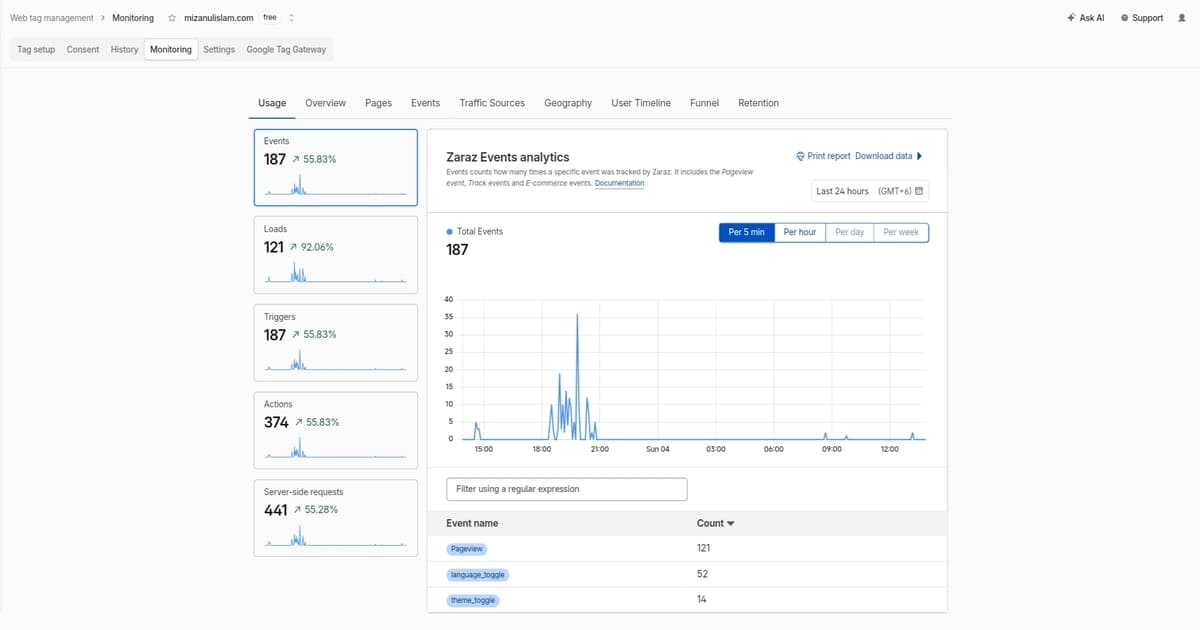
- theme_toggle — when a user switches between dark/light mode
- language_toggle — when a user switches between EN/BN
Each event fires server-side via Zaraz, so the data is clean and complete.
Key Learnings
- Server-side beats client-side for reliable tracking
- CSP syntax matters — one character can break everything
- Two tags needed for GA4 — Configuration + Event
- Zaraz simplifies sGTM without complex infrastructure
- Testing on real devices reveals issues desktop misses
Should You Use Zaraz or sGTM?
If you are on Cloudflare, Zaraz is significantly easier. It requires no server container, no custom domain for the server, and no Cloudflare Workers code.
If you are on another platform, traditional Server-Side GTM (sGTM) still works — it is just more involved.
What I Would Do Differently
Two things:
- Set up Zaraz from day one. I spent 2 days debugging client-side GTM when I could have started with server-side tracking.
- Write the CSP more carefully. I now have a template I reuse, but I learned the hard way.
The lesson: don't assume more tools mean better results. Sometimes the simplest solution (Zaraz) is the right one.